I bought the Dell S2522HG, a 24.5-inch Full HD gaming monitor designed for speed and smooth gameplay. What made it attractive to me was the combination of 240Hz refresh rate, 1 ms response time, Fast IPS panel, and 99% sRGB color coverage. According to Dell’s user guide, the monitor supports up to 240Hz, includes ergonomic adjustments, and offers both AMD FreeSync Premium and NVIDIA G-SYNC Compatible support [1].
Why I chose it
I wanted a monitor that would be suitable for:
- fast-paced gaming
- smooth motion clarity
- everyday desktop use
- good colors for an IPS gaming panel
- modern connectivity options
The 240Hz refresh rate is the main highlight here, especially for competitive games where fluid motion matters. The Fast IPS panel is also a nice balance between speed and image quality, giving better colors and viewing angles than older TN-based gaming monitors [1] [2].
Main specifications
- Model: Dell S2522HG
- Screen size: 24.5 inch
- Resolution: 1920 x 1080
- Panel type: Fast IPS
- Refresh rate: 240Hz
- Response time: 1 ms gray-to-gray (Extreme mode)
- Color coverage: 99% sRGB
- Adaptive sync: AMD FreeSync Premium, NVIDIA G-SYNC Compatible
- Viewing angles: 178° / 178°
- Brightness: 400 cd/m² [3] [1]
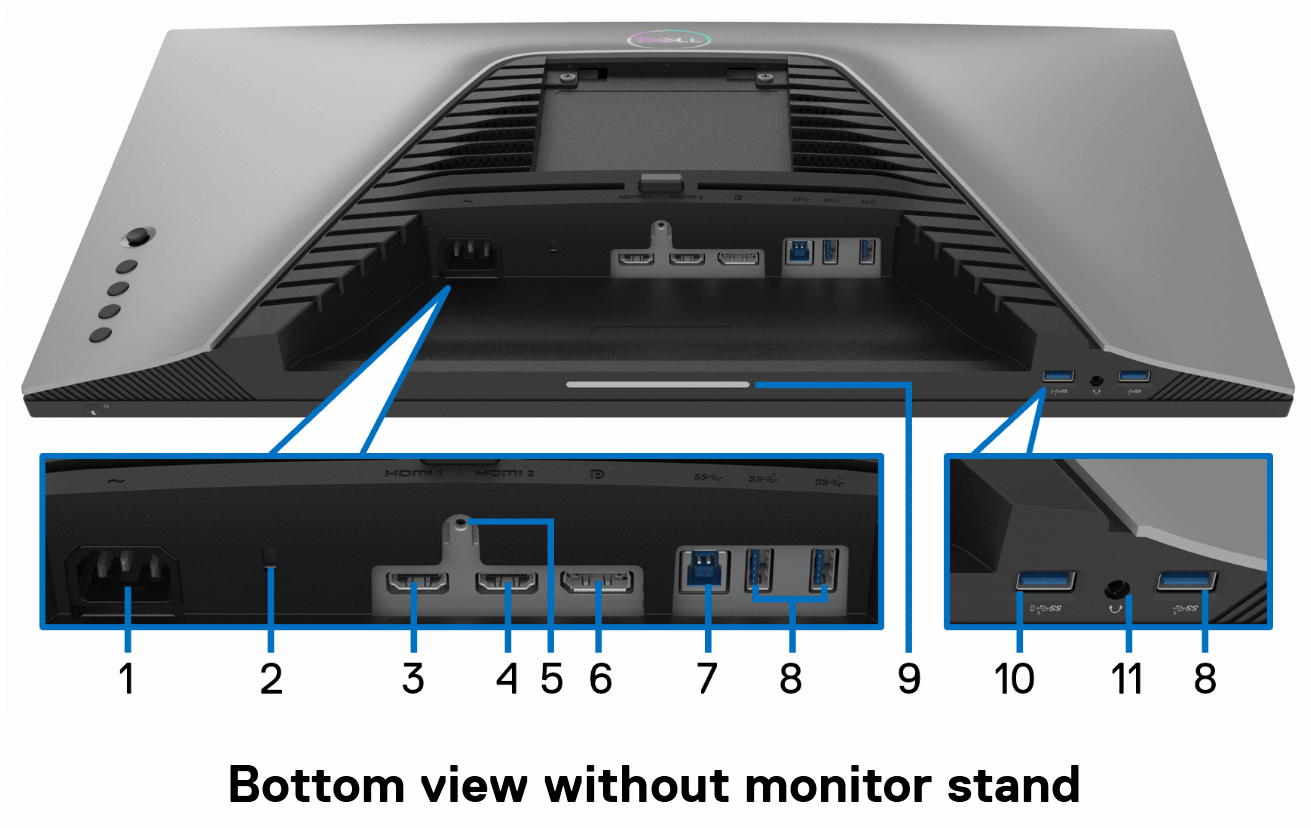
Connectivity
The Dell S2522HG comes with a practical set of ports:
- 2 x HDMI 2.0
- 1 x DisplayPort 1.2
- USB upstream
- multiple USB downstream ports
- audio line-out / headphone out [1]
This is useful if you want to connect both a PC and a console, while also using the monitor as a small USB hub.
| Label | Description | Use |
|---|---|---|
| 1 | Power connector | Connect the power cable (shipped with your monitor). |
| 2 | Security lock slot | Secure the monitor with a security lock (security lock not included). |
| 3 | HDMI port (HDMI 1) | Connect to your computer with the HDMI cable (shipped with your monitor). |
| 4 | HDMI port (HDMI 2) | Connect to your computer with the HDMI cable (shipped with your monitor). |
| 5 | Stand lock feature | Lock the stand to the monitor using an M3 x 6 mm screw (screw not included). |
| 6 | DisplayPort | Connect to your computer with the DisplayPort cable (shipped with your monitor). |
| 7 | SuperSpeed USB 5 Gbps (USB 3.2 Gen1) Type-B upstream port | Connect the USB cable (shipped with your monitor) from this port to your computer to enable the USB ports on your monitor. |
| 8 | SuperSpeed USB 5 Gbps (USB 3.2 Gen1) Type-A downstream port (3) | Connect your USB 3.2 Gen1 (5 Gbps) device. |
| 9 | Downlights | Turn the monitor downlights on or off. |
| 10 | SuperSpeed USB 5 Gbps (USB 3.2 Gen1) Type-A downstream port with Power Charging | Connect to charge your USB device. |
| 11 | Headphone out port | Connect the headphones to the monitor. |
Design and ergonomics
Like many Dell displays, this one also offers solid ergonomics. The stand supports:
- height adjustment
- tilt
- swivel
- pivot
That makes it easy to position correctly on the desk, whether for gaming sessions or regular daily use [1].
Final thoughts
The Dell S2522HG looks like a very good choice if you want a fast gaming monitor without giving up IPS image quality. The combination of 240Hz, 1 ms response time, and adaptive sync support makes it a strong option for competitive gaming, while the color performance keeps it pleasant for general use too.
For a Full HD high-refresh monitor, it offers a very balanced package.