Intel NUC8i7HVK (Hades Canyon) is a connectivity beast. For a machine this small, the sheer number of I/O options is impressive, making it a perfect “lab” PC or a compact workstation.
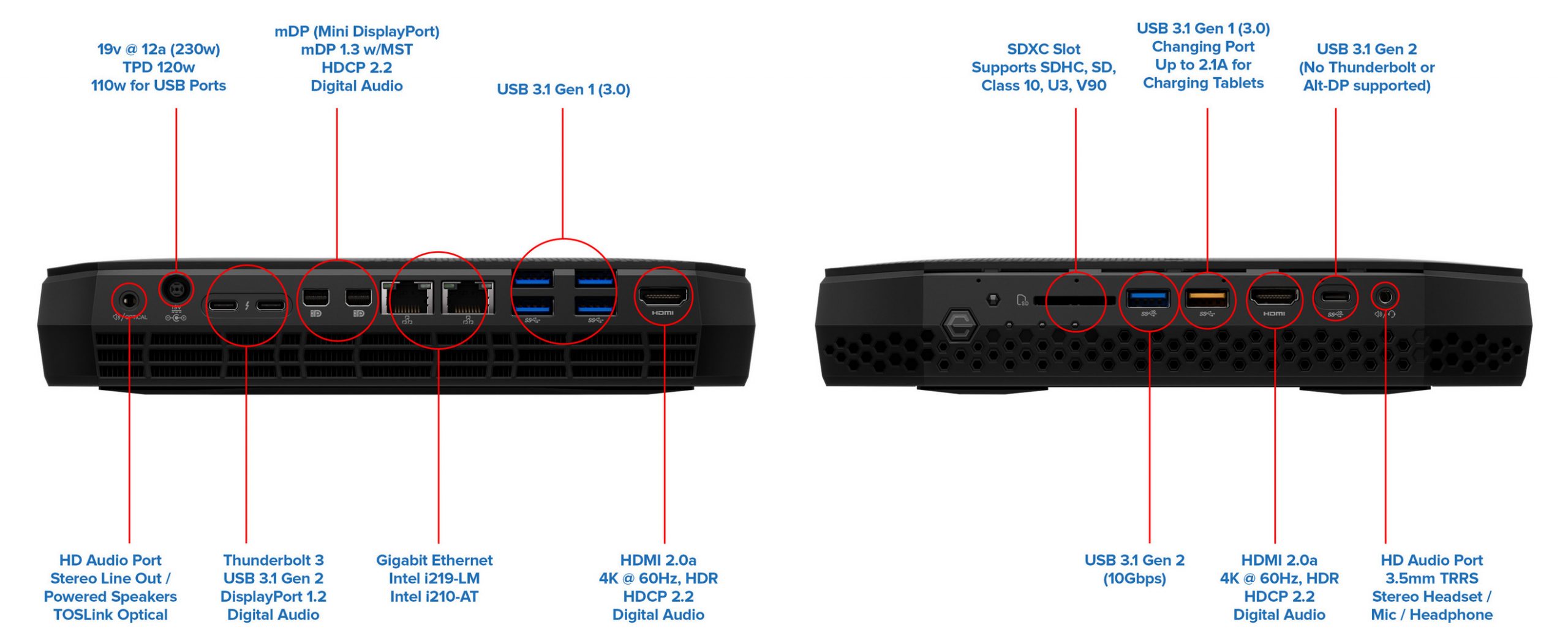
Here is a detailed breakdown of all the ports available on this unit:
Front Panel
The front is designed for quick access, especially for VR headsets and removable media:
- Power Button with customizable RGB LED.
- SDXC Card Reader: Supports UHS-I for fast photo and video transfers.
- USB 3.0 Type-A (Orange): Charging port that provides power even when the NUC is off.
- USB 3.1 Gen 2 Type-A (Blue): High-speed 10Gbps data transfer.
- HDMI 2.0a: Specifically placed here for easy VR headset (like Oculus or Vive) connectivity.
- USB 3.1 Gen 2 Type-C: 10Gbps port for modern peripherals.
- 3.5mm Audio Jack: Combined headphone/microphone port.
- Infrared Sensor: For remote control support.
Rear Panel
The back is where the heavy lifting happens, supporting up to six 4K displays:
- TOSLINK/Optical Audio: Combined with a 3.5mm jack for high-end audio setups.
- DC Power Input: For the 230W power brick.
- 2x Thunderbolt 3 (USB-C): 40Gbps ports that support daisy-chaining, external GPUs, or extra displays.
- 2x Mini DisplayPort 1.2: Dedicated video outputs.
- 2x Intel Gigabit LAN: Dual RJ45 ports, ideal for building a home lab, router, or link aggregation.
- 4x USB 3.0 Type-A: For your standard peripherals (Keyboard, Mouse, etc.).
- HDMI 2.0a: Main display output for monitors or TVs.
Internal Headers
If you open the case, you also have access to:
- 2x M.2 Slots: Supporting both SATA and NVMe SSDs (RAID-0/1 capable).
- Internal USB Headers: 2x USB 3.0 and 2x USB 2.0 headers for internal expansions or custom lids.
This specific port layout is exactly why I kept the NUC in my setup even after getting the MacBook Pro M2 Max—it acts as the perfect localized server and peripheral hub.