<?xml version="1.0" encoding="utf-8"?><feed xmlns="http://www.w3.org/2005/Atom" ><generator uri="https://jekyllrb.com/" version="3.10.0">Jekyll</generator><link href="https://www.octav.name/feed.xml" rel="self" type="application/atom+xml" /><link href="https://www.octav.name/" rel="alternate" type="text/html" /><updated>2026-03-07T16:07:39+00:00</updated><id>https://www.octav.name/feed.xml</id><title type="html">Octav.Name</title><subtitle>Random stuff</subtitle><entry><title type="html">MacBook Pro 16-inch M2 Max: Solving the Docker Struggle</title><link href="https://www.octav.name/2023/07/16-inch-macbook-pro-m2-max" rel="alternate" type="text/html" title="MacBook Pro 16-inch M2 Max: Solving the Docker Struggle" /><published>2023-07-11T10:00:00+00:00</published><updated>2023-07-11T10:00:00+00:00</updated><id>https://www.octav.name/2023/07/16-inch-macbook-pro-m2-max</id><content type="html" xml:base="https://www.octav.name/2023/07/16-inch-macbook-pro-m2-max"><![CDATA[<p>In June 2023, I made a significant addition to my setup: a <strong>16-inch MacBook Pro with the M2 Max chip (12-core CPU, 38-core GPU), 64GB of Unified Memory, and a 1TB SSD</strong>.</p>

<p>While my <a href="/2021/05/11/intel-nuc8i7hvk-ports/">Intel NUC8i7HVK</a> is still a capable machine, my business requirements reached a point where I needed more raw, reliable power. I didn’t migrate away from the NUC entirely, but the MacBook has taken over as my primary production workstation for one specific reason: <strong>Docker performance.</strong></p>

<h3 id="the-wsl2-bottleneck">The WSL2 Bottleneck</h3>
<p>For a long time, my workflow on the NUC relied on the <strong>Docker Desktop + WSL2</strong> combo. While functional, it eventually became a source of constant friction. Between the Vmmem memory consumption, the file system overhead when crossing between Windows and Linux, and the occasional networking hiccups, it started to eat into my billable hours.</p>

<p>I needed an environment where the hardware and the virtualization layer didn’t fight each other.</p>

<h3 id="the-m2-max--orbstack-miracle">The M2 Max + OrbStack Miracle</h3>
<p>Switching to the M2 Max was a revelation, but the real “secret sauce” was moving away from Docker Desktop in favor of <a href="https://orbstack.dev/">OrbStack</a>.</p>

<ul>
  <li><strong>The Power:</strong> With 64GB of RAM, I can run my entire microservices stack, multiple IDE instances, and countless browser tabs without the system ever breaking a sweat. The memory pressure stays green, even under heavy loads.</li>
  <li><strong>The Speed:</strong> OrbStack on Apple Silicon feels native. Containers start in seconds, and the CPU overhead is negligible compared to the old WSL2 setup.</li>
  <li><strong>Energy Efficiency:</strong> I can do heavy development work for hours on its battery. On the NUC, a heavy Docker load meant the fans were screaming; on the M2 Max, it’s usually silent.</li>
</ul>

<h3 id="integration-with-my-setup">Integration with my Setup</h3>
<p>The MacBook fits perfectly into my existing <a href="/despre">Setup</a>. I’m using it alongside my:</p>
<ul>
  <li><strong>Dell UltraSharp 27” 4K</strong> as the main external display.</li>
  <li><strong>Logitech MX Master 3S</strong> (the silent clicks are a great match for the quiet Mac).</li>
  <li><strong>Logitech MX Keys</strong> for a seamless typing experience across devices.</li>
</ul>

<h3 id="final-thoughts">Final Thoughts</h3>
<p>This wasn’t just a “shiny new gadget” purchase. It was a calculated move to eliminate technical debt in my own workflow. If you are struggling with Docker performance on Windows/WSL2 and your business depends on development speed, the jump to Apple Silicon (specifically with 64GB of RAM) is the best investment you can make.</p>

<p>The M2 Max isn’t just a laptop; it’s a force multiplier for my daily work.</p>]]></content><author><name>octav</name></author><category term="Tech" /><category term="Apple" /><category term="MacBook" /><category term="Docker" /><category term="Productivity" /><summary type="html"><![CDATA[I made a significant addition to my setup: a 16-inch MacBook Pro with the M2 Max chip (12-core CPU, 38-core GPU), 64GB of Unified Memory and a 1TB SSD.]]></summary><media:thumbnail xmlns:media="http://search.yahoo.com/mrss/" url="https://www.octav.name/wp-content/uploads/2023/07/macbook-pro-2023-16in-m2-max.png" /><media:content medium="image" url="https://www.octav.name/wp-content/uploads/2023/07/macbook-pro-2023-16in-m2-max.png" xmlns:media="http://search.yahoo.com/mrss/" /></entry><entry><title type="html">Monitor gaming DELL S2522HG 24.5 inch Full HD 240Hz 1 ms</title><link href="https://www.octav.name/2021/09/monitor-gaming-dell-s2522hg" rel="alternate" type="text/html" title="Monitor gaming DELL S2522HG 24.5 inch Full HD 240Hz 1 ms" /><published>2021-09-02T10:00:00+00:00</published><updated>2021-09-02T10:00:00+00:00</updated><id>https://www.octav.name/2021/09/monitor-gaming-dell-s2522hg</id><content type="html" xml:base="https://www.octav.name/2021/09/monitor-gaming-dell-s2522hg"><![CDATA[<p>I bought the <strong>Dell S2522HG</strong>, a <strong>24.5-inch Full HD gaming monitor</strong> designed for speed and smooth gameplay. What made it attractive to me was the combination of <strong>240Hz refresh rate</strong>, <strong>1 ms response time</strong>, <strong>Fast IPS panel</strong>, and <strong>99% sRGB color coverage</strong>. According to Dell’s user guide, the monitor supports up to <strong>240Hz</strong>, includes ergonomic adjustments, and offers both <strong>AMD FreeSync Premium</strong> and <strong>NVIDIA G-SYNC Compatible</strong> support <a href="https://dl.dell.com/manuals/all-products/esuprt_electronics_accessories/esuprt_electronics_accessories_monitor/dell-s2522hg-monitor_Users-Guide_en-us.pdf">[1]</a>.</p>

<h3 id="why-i-chose-it">Why I chose it</h3>

<p>I wanted a monitor that would be suitable for:</p>

<ul>
  <li>fast-paced gaming</li>
  <li>smooth motion clarity</li>
  <li>everyday desktop use</li>
  <li>good colors for an IPS gaming panel</li>
  <li>modern connectivity options</li>
</ul>

<p>The <strong>240Hz refresh rate</strong> is the main highlight here, especially for competitive games where fluid motion matters. The <strong>Fast IPS</strong> panel is also a nice balance between speed and image quality, giving better colors and viewing angles than older TN-based gaming monitors <a href="https://dl.dell.com/manuals/all-products/esuprt_electronics_accessories/esuprt_electronics_accessories_monitor/dell-s2522hg-monitor_Users-Guide_en-us.pdf">[1]</a> <a href="https://content.ekatalog.biz/katalog/D-M-S2522HG/Dell-25-Gaming-Monitor-S2522HG-Reviewers-Guide_EU.pdf">[2]</a>.</p>

<h3 id="main-specifications">Main specifications</h3>

<ul>
  <li><strong>Model:</strong> Dell S2522HG</li>
  <li><strong>Screen size:</strong> 24.5 inch</li>
  <li><strong>Resolution:</strong> 1920 x 1080</li>
  <li><strong>Panel type:</strong> Fast IPS</li>
  <li><strong>Refresh rate:</strong> 240Hz</li>
  <li><strong>Response time:</strong> 1 ms gray-to-gray (Extreme mode)</li>
  <li><strong>Color coverage:</strong> 99% sRGB</li>
  <li><strong>Adaptive sync:</strong> AMD FreeSync Premium, NVIDIA G-SYNC Compatible</li>
  <li><strong>Viewing angles:</strong> 178° / 178°</li>
  <li><strong>Brightness:</strong> 400 cd/m² <a href="https://www.displayspecifications.com/en/model/a11526ff">[3]</a> <a href="https://dl.dell.com/manuals/all-products/esuprt_electronics_accessories/esuprt_electronics_accessories_monitor/dell-s2522hg-monitor_Users-Guide_en-us.pdf">[1]</a></li>
</ul>

<h3 id="connectivity">Connectivity</h3>

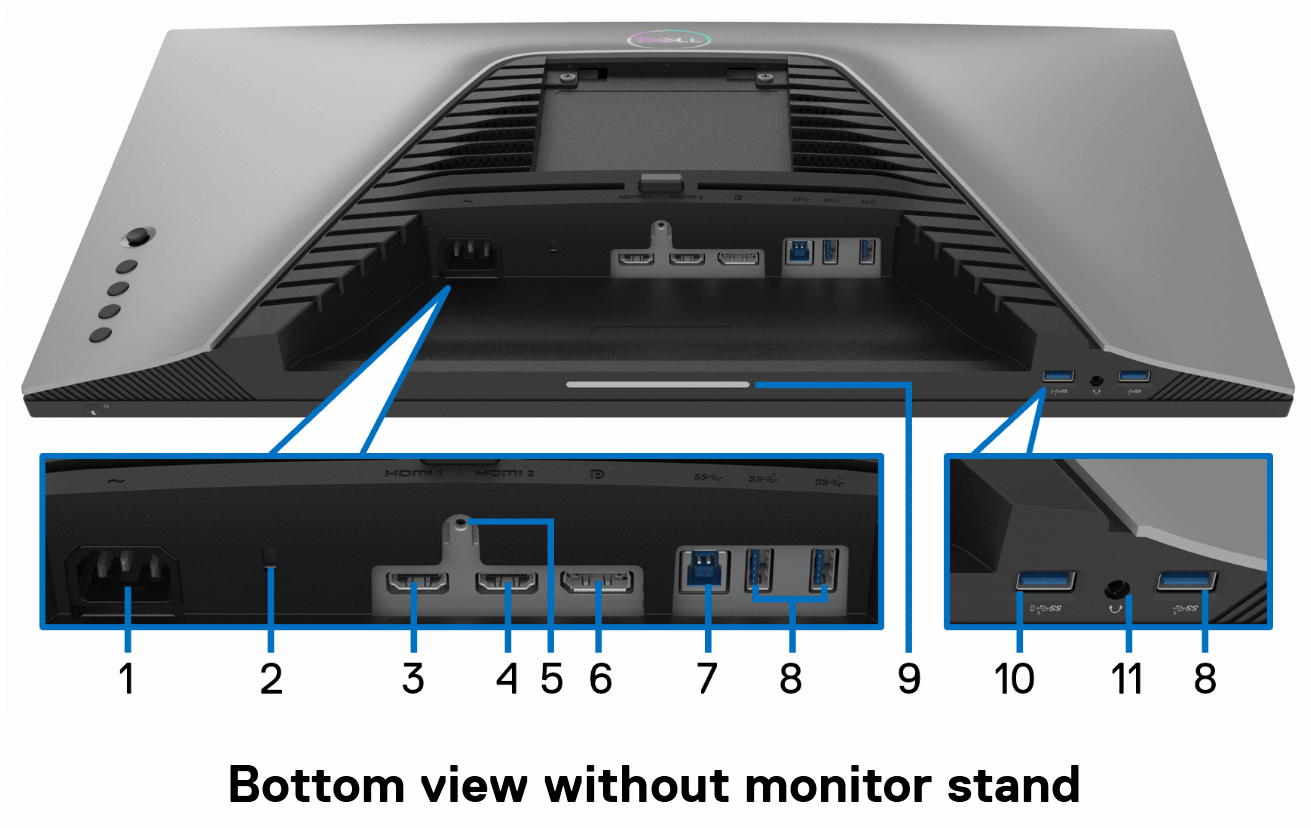
<p>The Dell S2522HG comes with a practical set of ports:</p>

<ul>
  <li><strong>2 x HDMI 2.0</strong></li>
  <li><strong>1 x DisplayPort 1.2</strong></li>
  <li><strong>USB upstream</strong></li>
  <li><strong>multiple USB downstream ports</strong></li>
  <li><strong>audio line-out / headphone out</strong> <a href="https://dl.dell.com/manuals/all-products/esuprt_electronics_accessories/esuprt_electronics_accessories_monitor/dell-s2522hg-monitor_Users-Guide_en-us.pdf">[1]</a></li>
</ul>

<p>This is useful if you want to connect both a PC and a console, while also using the monitor as a small USB hub.</p>

<table>
  <thead>
    <tr>
      <th>Label</th>
      <th>Description</th>
      <th>Use</th>
    </tr>
  </thead>
  <tbody>
    <tr>
      <td>1</td>
      <td>Power connector</td>
      <td>Connect the power cable (shipped with your monitor).</td>
    </tr>
    <tr>
      <td>2</td>
      <td>Security lock slot</td>
      <td>Secure the monitor with a security lock (security lock not included).</td>
    </tr>
    <tr>
      <td>3</td>
      <td>HDMI port (HDMI 1)</td>
      <td>Connect to your computer with the HDMI cable (shipped with your monitor).</td>
    </tr>
    <tr>
      <td>4</td>
      <td>HDMI port (HDMI 2)</td>
      <td>Connect to your computer with the HDMI cable (shipped with your monitor).</td>
    </tr>
    <tr>
      <td>5</td>
      <td>Stand lock feature</td>
      <td>Lock the stand to the monitor using an M3 x 6 mm screw (screw not included).</td>
    </tr>
    <tr>
      <td>6</td>
      <td>DisplayPort</td>
      <td>Connect to your computer with the DisplayPort cable (shipped with your monitor).</td>
    </tr>
    <tr>
      <td>7</td>
      <td>SuperSpeed USB 5 Gbps (USB 3.2 Gen1) Type-B upstream port</td>
      <td>Connect the USB cable (shipped with your monitor) from this port to your computer to enable the USB ports on your monitor.</td>
    </tr>
    <tr>
      <td>8</td>
      <td>SuperSpeed USB 5 Gbps (USB 3.2 Gen1) Type-A downstream port (3)</td>
      <td>Connect your USB 3.2 Gen1 (5 Gbps) device.</td>
    </tr>
    <tr>
      <td>9</td>
      <td>Downlights</td>
      <td>Turn the monitor downlights on or off.</td>
    </tr>
    <tr>
      <td>10</td>
      <td>SuperSpeed USB 5 Gbps (USB 3.2 Gen1) Type-A downstream port with Power Charging</td>
      <td>Connect to charge your USB device.</td>
    </tr>
    <tr>
      <td>11</td>
      <td>Headphone out port</td>
      <td>Connect the headphones to the monitor.</td>
    </tr>
  </tbody>
</table>

<p class="align-center"><img decoding="async" alt="" width="965" title="" src="/wp-content/uploads/2021/09/ports.png" /></p>

<h3 id="design-and-ergonomics">Design and ergonomics</h3>

<p>Like many Dell displays, this one also offers solid ergonomics. The stand supports:</p>

<ul>
  <li><strong>height adjustment</strong></li>
  <li><strong>tilt</strong></li>
  <li><strong>swivel</strong></li>
  <li><strong>pivot</strong></li>
</ul>

<p>That makes it easy to position correctly on the desk, whether for gaming sessions or regular daily use <a href="https://dl.dell.com/manuals/all-products/esuprt_electronics_accessories/esuprt_electronics_accessories_monitor/dell-s2522hg-monitor_Users-Guide_en-us.pdf">[1]</a>.</p>

<h3 id="final-thoughts">Final thoughts</h3>

<p>The <strong>Dell S2522HG</strong> looks like a very good choice if you want a fast gaming monitor without giving up IPS image quality. The combination of <strong>240Hz</strong>, <strong>1 ms response time</strong>, and <strong>adaptive sync support</strong> makes it a strong option for competitive gaming, while the color performance keeps it pleasant for general use too.</p>

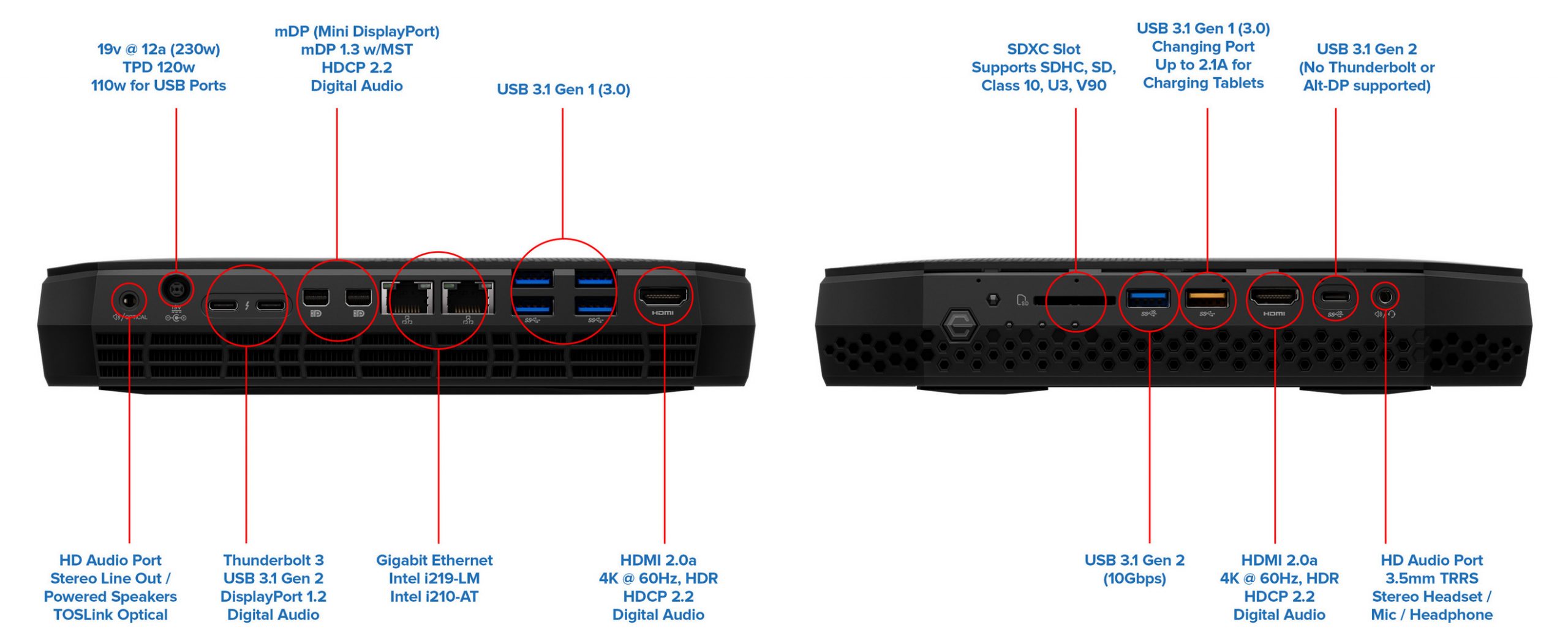
<p>For a Full HD high-refresh monitor, it offers a very balanced package.</p>]]></content><author><name>octav</name></author><category term="Tech" /><category term="Dell" /><category term="Monitor" /><category term="Gaming" /><category term="IPS" /><category term="240Hz" /><category term="Full HD" /><summary type="html"><![CDATA[I bought the Dell S2522HG, a 24.5-inch Full HD gaming monitor with 240Hz refresh rate, 1 ms response time and IPS panel.]]></summary><media:thumbnail xmlns:media="http://search.yahoo.com/mrss/" url="https://www.octav.name/wp-content/uploads/2021/09/dell-s2522hg.jpg" /><media:content medium="image" url="https://www.octav.name/wp-content/uploads/2021/09/dell-s2522hg.jpg" xmlns:media="http://search.yahoo.com/mrss/" /></entry><entry><title type="html">Intel NUC8i7HVK ports</title><link href="https://www.octav.name/2021/05/intel-nuc8i7hvk-ports" rel="alternate" type="text/html" title="Intel NUC8i7HVK ports" /><published>2021-05-11T08:33:49+00:00</published><updated>2021-05-11T08:33:49+00:00</updated><id>https://www.octav.name/2021/05/intel-nuc8i7hvk-ports</id><content type="html" xml:base="https://www.octav.name/2021/05/intel-nuc8i7hvk-ports"><![CDATA[<p>Intel NUC8i7HVK (Hades Canyon) is a connectivity beast. For a machine this small, the sheer number of I/O options is impressive, making it a perfect “lab” PC or a compact workstation.</p>

<p><img decoding="async" alt="" width="2560" title="" src="/wp-content/uploads/2021/05/NUC8i7HVK-scaled.jpg" data-original="/wp-content/uploads/2021/05/NUC8i7HVK.jpg" srcset="/wp-content/uploads/2021/05/NUC8i7HVK-scaled.jpg 2560w" sizes="(max-width: 2560px) 100vw, 2560px" /></p>

<p>Here is a detailed breakdown of all the ports available on this unit:</p>

<h3 id="front-panel">Front Panel</h3>
<p>The front is designed for quick access, especially for VR headsets and removable media:</p>
<ul>
  <li><strong>Power Button</strong> with customizable RGB LED.</li>
  <li><strong>SDXC Card Reader:</strong> Supports UHS-I for fast photo and video transfers.</li>
  <li><strong>USB 3.0 Type-A (Orange):</strong> Charging port that provides power even when the NUC is off.</li>
  <li><strong>USB 3.1 Gen 2 Type-A (Blue):</strong> High-speed 10Gbps data transfer.</li>
  <li><strong>HDMI 2.0a:</strong> Specifically placed here for easy VR headset (like Oculus or Vive) connectivity.</li>
  <li><strong>USB 3.1 Gen 2 Type-C:</strong> 10Gbps port for modern peripherals.</li>
  <li><strong>3.5mm Audio Jack:</strong> Combined headphone/microphone port.</li>
  <li><strong>Infrared Sensor:</strong> For remote control support.</li>
</ul>

<h3 id="rear-panel">Rear Panel</h3>
<p>The back is where the heavy lifting happens, supporting up to six 4K displays:</p>
<ul>
  <li><strong>TOSLINK/Optical Audio:</strong> Combined with a 3.5mm jack for high-end audio setups.</li>
  <li><strong>DC Power Input:</strong> For the 230W power brick.</li>
  <li><strong>2x Thunderbolt 3 (USB-C):</strong> 40Gbps ports that support daisy-chaining, external GPUs, or extra displays.</li>
  <li><strong>2x Mini DisplayPort 1.2:</strong> Dedicated video outputs.</li>
  <li><strong>2x Intel Gigabit LAN:</strong> Dual RJ45 ports, ideal for building a home lab, router, or link aggregation.</li>
  <li><strong>4x USB 3.0 Type-A:</strong> For your standard peripherals (Keyboard, Mouse, etc.).</li>
  <li><strong>HDMI 2.0a:</strong> Main display output for monitors or TVs.</li>
</ul>

<h3 id="internal-headers">Internal Headers</h3>
<p>If you open the case, you also have access to:</p>
<ul>
  <li><strong>2x M.2 Slots:</strong> Supporting both SATA and NVMe SSDs (RAID-0/1 capable).</li>
  <li><strong>Internal USB Headers:</strong> 2x USB 3.0 and 2x USB 2.0 headers for internal expansions or custom lids.</li>
</ul>

<p>This specific port layout is exactly why I kept the NUC in my setup even after getting the MacBook Pro M2 Max—it acts as the perfect localized server and peripheral hub.</p>]]></content><author><name>octav</name></author><category term="Tech" /><category term="Intel" /><category term="NUC" /><category term="Hades Canyon" /><category term="Ports" /><category term="Connectivity" /><summary type="html"><![CDATA[Intel NUC8i7HVK (Hades Canyon) is a connectivity beast. For a machine this small, the sheer number of I/O options is impressive, making it a perfect lab PC or a compact workstation.]]></summary><media:thumbnail xmlns:media="http://search.yahoo.com/mrss/" url="https://www.octav.name/wp-content/uploads/2021/05/NUC8i7HVK-scaled.jpg" /><media:content medium="image" url="https://www.octav.name/wp-content/uploads/2021/05/NUC8i7HVK-scaled.jpg" xmlns:media="http://search.yahoo.com/mrss/" /></entry><entry><title type="html">Scaun Ergohuman v1 Plus, mesh 3D Negru</title><link href="https://www.octav.name/2020/10/ergohuman-v1-plus-mesh-3d-black-chair" rel="alternate" type="text/html" title="Scaun Ergohuman v1 Plus, mesh 3D Negru" /><published>2020-10-08T18:10:08+00:00</published><updated>2020-10-08T18:10:08+00:00</updated><id>https://www.octav.name/2020/10/ergohuman-v1-plus-mesh-3d-black-chair</id><content type="html" xml:base="https://www.octav.name/2020/10/ergohuman-v1-plus-mesh-3d-black-chair"><![CDATA[<p><img class="align-right" src="/wp-content/uploads/2020/10/ehs-ham-2.jpg" alt="Ergohuman" width="682" height="382" />
Scaunul Ergohuman este o fuziune perfecta intre arta si stiinta, cu zone flex, care asigura sustinerea constanta a spatelui si a zonei lombare, cu bratele reglabile multi-dimensionale care permit un suport de neegalat si cu o tetiera pivotanta, reglabila pe inaltime, pentru sprijin cranian complet.</p>

<p>Ergohuman a fost proiectat special pentru cei care stau pe scaun, la birou, pentru perioade lungi de timp si necesita “Intensive Use Seating”, pentru a-i mentine confortabili. Estetica, forma si functiile acestui scaun ergonomic permit utilizarea unui mecanism de inclinare, syncron, cu 3 blocaje pozitionale, scaun culisant, reglaj pe inaltime pneumatic, sistem automat a suportului lombar, inaltime si unghi reglabile pentru brate si tetiera, toate intr-un singur scaun ergonomic unic.</p>

<p>Foloseste simplu si ingenios maneta de control a scaunului pentru a opera cele trei functii utilizate cel mai frecvent - inaltimea scaunului, adancimea sezutului si unghiul de inclinare al spatarului, toate operate de la un singur punct de contact. Un scaun de birou eco-friendly, intuitiv, elegant, care creeaza o experienta unica de relaxare, usor de utilizat, cu 97% reciclabilitate, care are certificat Greenguard si indeplineste standardele EN 1335-2: 2009 si EN 1335-3: 2009. Disponibil intr-o gama variata de mesh-uri, materiale textile sau piele, cu rama si baza din aluminiu polisat.</p>

<h3 id="caracteristici">Caracteristici</h3>

<ul>
  <li>scaun ergonomic de birou, cu design modern</li>
  <li>confort intensiv timp de 8 ore pe zi</li>
  <li>mecanism syncron cu trei pozitii de blocare, cu posibilitatea schimbarii unghiului dintre sezut si spatar</li>
  <li>maneta unica de control a mecanismului</li>
  <li>suport lombar automat si flexibil</li>
  <li>spatar reglabil in inaltime</li>
  <li>sezut cu translatie, reglabil in adancime</li>
  <li>brate multi-dimensionale reglabile pe inaltime, in adancime sau in laterala</li>
  <li>tetiera reglabila 2D</li>
</ul>

<table>
  <thead>
    <tr>
      <th>Date generale</th>
      <th> </th>
    </tr>
  </thead>
  <tbody>
    <tr>
      <td>Mecanism scaun :</td>
      <td>Syncron “cu antisoc”</td>
    </tr>
    <tr>
      <td>Sezut scaun :</td>
      <td>Translabil</td>
    </tr>
    <tr>
      <td>Suport lombar :</td>
      <td>Da</td>
    </tr>
    <tr>
      <td>Tetiera :</td>
      <td>Da / Reglabila</td>
    </tr>
    <tr>
      <td>Brate :</td>
      <td>Reglabile</td>
    </tr>
    <tr>
      <td>Model brate :</td>
      <td>Plastic / Cromate</td>
    </tr>
    <tr>
      <td>Baza scaun :</td>
      <td>Aluminiu</td>
    </tr>
    <tr>
      <td>Brand :</td>
      <td>Ergohuman</td>
    </tr>
  </tbody>
</table>

<table>
  <thead>
    <tr>
      <th>Accesorii</th>
      <th> </th>
    </tr>
  </thead>
  <tbody>
    <tr>
      <td>Role :</td>
      <td>Cauciucate 6.5 cm</td>
    </tr>
  </tbody>
</table>

<p><img class="align-center" src="/wp-content/uploads/2020/10/ehs-ham-kmd-31-functions.jpg" alt="Functii" width="896" height="383" /></p>

<h3 id="dimensiuni">Dimensiuni</h3>

<p><img class="align-center" src="/wp-content/uploads/2020/10/ehs-ham-kmd-31-dimensions.jpg" alt="Dimensiuni" width="886" height="421" /></p>

<table>
  <thead>
    <tr>
      <th>Dimensiuni</th>
      <th> </th>
    </tr>
  </thead>
  <tbody>
    <tr>
      <td>Diametru baza (cm):</td>
      <td>66</td>
    </tr>
    <tr>
      <td>Lungime scaun (cm):</td>
      <td>68.5</td>
    </tr>
    <tr>
      <td>Latime scaun (cm):</td>
      <td>66</td>
    </tr>
    <tr>
      <td>Latime spatar (cm):</td>
      <td>52.5</td>
    </tr>
    <tr>
      <td>Lungime sezut (cm):</td>
      <td>52</td>
    </tr>
    <tr>
      <td>Adancime sezut (cm):</td>
      <td>47 - 52</td>
    </tr>
    <tr>
      <td>Inaltime minima sezut (cm):</td>
      <td>43</td>
    </tr>
    <tr>
      <td>Inaltime maxima sezut (cm):</td>
      <td>54</td>
    </tr>
    <tr>
      <td>Inaltime totala (cm):</td>
      <td>116 - 129,5</td>
    </tr>
    <tr>
      <td>Volum cutie (m3):</td>
      <td>0.29</td>
    </tr>
    <tr>
      <td>Greutate (kg):</td>
      <td>23.6</td>
    </tr>
  </tbody>
</table>]]></content><author><name>octav</name></author><category term="Shopping" /><summary type="html"><![CDATA[Scaunul Ergohuman este o fuziune perfecta intre arta si stiinta, cu zone flex, care asigura sustinerea constanta a spatelui si a zonei lombare...]]></summary><media:thumbnail xmlns:media="http://search.yahoo.com/mrss/" url="https://www.octav.name/wp-content/uploads/2020/10/ehs-ham-1.jpg" /><media:content medium="image" url="https://www.octav.name/wp-content/uploads/2020/10/ehs-ham-1.jpg" xmlns:media="http://search.yahoo.com/mrss/" /></entry><entry><title type="html">Monitor LED DELL U2718Q 27 inch 4K 60Hz 5 ms</title><link href="https://www.octav.name/2019/11/monitor-led-dell-u2718q-27-inch-4k-5-ms-black-60hz" rel="alternate" type="text/html" title="Monitor LED DELL U2718Q 27 inch 4K 60Hz 5 ms" /><published>2019-11-18T10:00:00+00:00</published><updated>2019-11-18T10:00:00+00:00</updated><id>https://www.octav.name/2019/11/monitor-led-dell-u2718q-27-inch-4k-5-ms-black-60hz</id><content type="html" xml:base="https://www.octav.name/2019/11/monitor-led-dell-u2718q-27-inch-4k-5-ms-black-60hz"><![CDATA[<p><strong>Dell UltraSharp U2718Q</strong>, a <strong>27-inch 4K monitor</strong> that quickly became an important part of my desk setup. What attracted me to this display was the combination of <strong>3840 x 2160 resolution</strong>, <strong>IPS panel</strong>, <strong>60Hz refresh rate</strong>, and <strong>5 ms response time</strong>. According to Dell’s user guide, the U2718Q offers a 27-inch viewable area, 4K UHD resolution, wide viewing angles, and support for <strong>1.07 billion colors</strong> <a href="https://dl.dell.com/manuals/all-products/esuprt_display_projector/esuprt_display/dell-u2718q-monitor_user's-guide_en-us.pdf">[1]</a>.</p>

<h3 id="why-i-chose-it">Why I chose it</h3>

<p>I wanted a monitor that would be suitable for:</p>

<ul>
  <li>daily office work</li>
  <li>programming</li>
  <li>photo and content viewing</li>
  <li>sharp text rendering</li>
  <li>enough screen space for multiple windows</li>
</ul>

<p>The <strong>4K resolution</strong> on a 27-inch panel gives a very crisp image, and the IPS technology helps with consistent colors and wide viewing angles. Dell also specifies strong color coverage, including <strong>99.9% sRGB</strong> and <strong>99.9% Rec. 709</strong>, which makes it a very solid all-round display for productivity and media consumption <a href="https://www.officestationery.co.uk/documents/35799-EXR8DELLU2718Q.pdf">[2]</a>.</p>

<h3 id="main-specifications">Main specifications</h3>

<ul>
  <li><strong>Model:</strong> Dell UltraSharp U2718Q</li>
  <li><strong>Screen size:</strong> 27 inch</li>
  <li><strong>Resolution:</strong> 3840 x 2160</li>
  <li><strong>Panel type:</strong> IPS</li>
  <li><strong>Refresh rate:</strong> 60Hz</li>
  <li><strong>Response time:</strong> 5 ms (fast mode), 8 ms (normal mode)</li>
  <li><strong>Aspect ratio:</strong> 16:9</li>
  <li><strong>Brightness:</strong> 350 cd/m²</li>
  <li><strong>Contrast ratio:</strong> 1300:1</li>
  <li><strong>Viewing angles:</strong> 178° / 178°</li>
  <li><strong>Color depth:</strong> 1.07 billion colors <a href="https://dl.dell.com/manuals/all-products/esuprt_display_projector/esuprt_display/dell-u2718q-monitor_user's-guide_en-us.pdf">[1]</a> <a href="https://www.officestationery.co.uk/documents/35799-EXR8DELLU2718Q.pdf">[2]</a></li>
</ul>

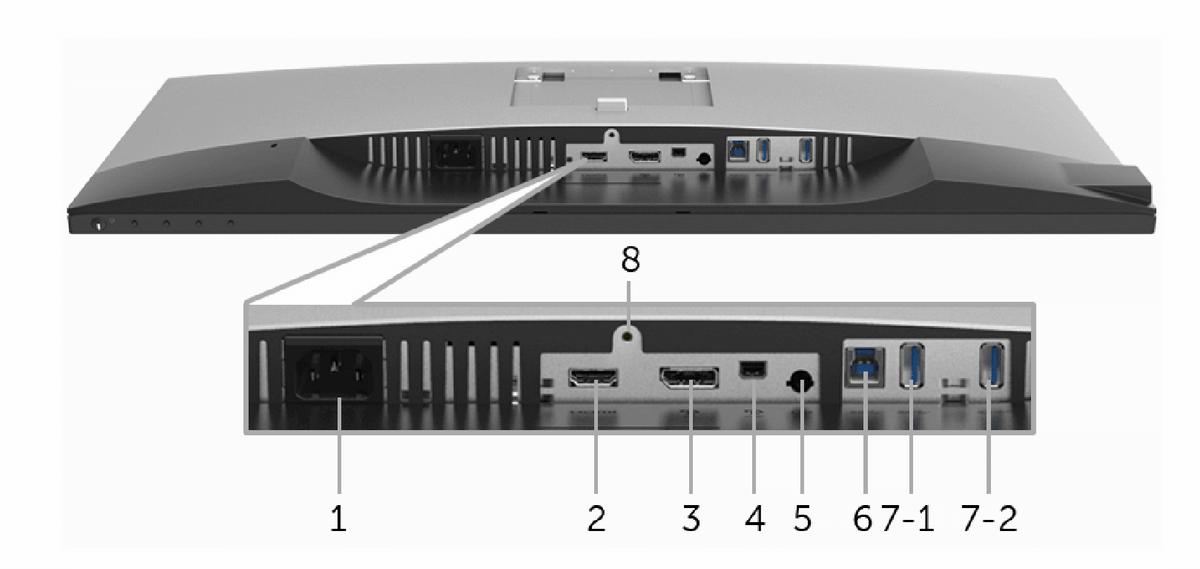
<h3 id="connectivity">Connectivity</h3>

<p>One of the strong points of this monitor is its flexibility. The U2718Q includes:</p>

<ul>
  <li><strong>DisplayPort</strong></li>
  <li><strong>Mini DisplayPort</strong></li>
  <li><strong>HDMI</strong></li>
  <li><strong>USB 3.0 hub</strong></li>
  <li><strong>audio line-out</strong> <a href="https://dl.dell.com/manuals/all-products/esuprt_display_projector/esuprt_display/dell-u2718q-monitor_user's-guide_en-us.pdf">[1]</a></li>
</ul>

<p>This made it easy to connect different systems over time, without constantly changing cables or adapters.</p>

<table>
  <thead>
    <tr>
      <th>Label</th>
      <th>Description</th>
      <th>Use</th>
    </tr>
  </thead>
  <tbody>
    <tr>
      <td>1</td>
      <td>AC power connector</td>
      <td>Connect the power cable.</td>
    </tr>
    <tr>
      <td>2</td>
      <td>HDMI port connector</td>
      <td>Connect your computer with an HDMI cable.</td>
    </tr>
    <tr>
      <td>3</td>
      <td>DisplayPort in connector</td>
      <td>Connect your computer with a DP cable.</td>
    </tr>
    <tr>
      <td>4</td>
      <td>Mini DisplayPort in connector</td>
      <td>Connect your computer with a Mini-DP to DP cable.</td>
    </tr>
    <tr>
      <td>5</td>
      <td>Audio-Line out</td>
      <td>Connect your speakers.*</td>
    </tr>
    <tr>
      <td>6</td>
      <td>USB upstream port</td>
      <td>Connect the USB cable that came with your monitor to the computer. Once this cable is connected, you can use the USB connectors on the monitor.</td>
    </tr>
    <tr>
      <td>7-1</td>
      <td>USB downstream port</td>
      <td>Connect your USB device. You can only use this connector after you have connected the USB cable to the computer and USB upstream connector on the monitor.**</td>
    </tr>
    <tr>
      <td>7-2</td>
      <td>USB downstream port with Power Charging</td>
      <td>Connect to charge your device.</td>
    </tr>
    <tr>
      <td>8</td>
      <td>Stand lock feature</td>
      <td>To lock the stand to the monitor using a M3 x 6 mm screw (screw not included).</td>
    </tr>
  </tbody>
</table>

<p class="align-center"><img decoding="async" alt="" width="1200" title="" src="/wp-content/uploads/2019/11/ports.png" /></p>

<h3 id="design-and-ergonomics">Design and ergonomics</h3>

<p>The monitor has the typical <strong>Dell UltraSharp</strong> look: clean, professional, and understated. It also supports ergonomic adjustments and <strong>VESA mounting</strong>, which is always useful for a cleaner desk setup or monitor arm installation <a href="https://dl.dell.com/manuals/all-products/esuprt_display_projector/esuprt_display/dell-u2718q-monitor_user's-guide_en-us.pdf">[1]</a>.</p>

<h3 id="final-thoughts">Final thoughts</h3>

<p>The <strong>Dell U2718Q</strong> turned out to be a very good purchase. It delivered exactly what I wanted: a sharp 4K image, good colors, modern connectivity, and a design that fits well in a work-focused environment.</p>

<p>For productivity and everyday use, this monitor has been a reliable choice.</p>]]></content><author><name>octav</name></author><category term="Tech" /><category term="Dell" /><category term="Monitor" /><category term="4K" /><category term="IPS" /><category term="UltraSharp" /><summary type="html"><![CDATA[I bought the Dell UltraSharp U2718Q, a 27-inch 4K monitor with IPS panel, 60Hz refresh rate and 5 ms response time.]]></summary><media:thumbnail xmlns:media="http://search.yahoo.com/mrss/" url="https://www.octav.name/wp-content/uploads/2019/11/dell-u2718q.jpg" /><media:content medium="image" url="https://www.octav.name/wp-content/uploads/2019/11/dell-u2718q.jpg" xmlns:media="http://search.yahoo.com/mrss/" /></entry><entry><title type="html">Create a SOCKS proxy on Linux with SSH to bypass content filters</title><link href="https://www.octav.name/2017/01/create-a-socks-proxy-on-a-linux-server-with-ssh-to-bypass-content-filters" rel="alternate" type="text/html" title="Create a SOCKS proxy on Linux with SSH to bypass content filters" /><published>2017-01-23T09:10:00+00:00</published><updated>2017-01-23T09:10:00+00:00</updated><id>https://www.octav.name/2017/01/create-a-socks-proxy-on-a-linux-server-with-ssh-to-bypass-content-filters</id><content type="html" xml:base="https://www.octav.name/2017/01/create-a-socks-proxy-on-a-linux-server-with-ssh-to-bypass-content-filters"><![CDATA[<p>Are you on a network with limited access? Is someone filtering your internet traffic, limiting your abilities? Well, if you have SSH access to <em>any</em>server, you can probably set up your own SOCKS5 proxy and tunnel all your traffic over SSH.</p>
<p>From that point on, what you do on your laptop/computer is sent encrypted to the SOCKS5 proxy (your SSH server) and <em>that</em> server sends the traffic to the outside. It's an SSH tunnel on steroids through which you can easily pass HTTP and HTTPs traffic. And it isn't even that hard. This guide is for Linux/Mac OSX users that have direct access to a terminal, but the same logic applies to <em>PuTTy</em> on Windows too.</p>
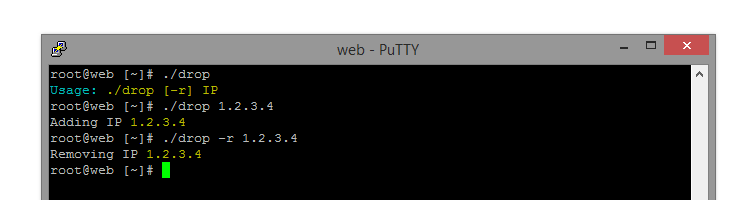
<p><a href="https://ma.ttias.be/socks-proxy-linux-ssh-bypass-content-filters/">See full article</a></p>]]></content><author><name>octav</name></author><category term="Tech" /><summary type="html"><![CDATA[Are you on a network with limited access? Is someone filtering your internet traffic, limiting your abilities? Well, if you have SSH access to anyserver, you can probably set up your own SOCKS5 proxy and tunnel all your traffic over SSH. From that point on, what you do on your laptop/computer is sent encrypted to the SOCKS5 proxy (your SSH server) and that server sends the traffic to the outside. It's an SSH tunnel on steroids through which you can easily pass HTTP and HTTPs traffic. And it isn't even that hard. This guide is for Linux/Mac OSX users that have direct access to a terminal, but the same logic applies to PuTTy on Windows too. See full article]]></summary></entry><entry><title type="html">Block an IP address with bash script on a Linux server</title><link href="https://www.octav.name/2015/05/bash-script-to-block-an-ip-address-on-a-linux-server" rel="alternate" type="text/html" title="Block an IP address with bash script on a Linux server" /><published>2015-05-20T10:12:30+00:00</published><updated>2015-05-20T10:12:30+00:00</updated><id>https://www.octav.name/2015/05/bash-script-to-block-an-ip-address-on-a-linux-server</id><content type="html" xml:base="https://www.octav.name/2015/05/bash-script-to-block-an-ip-address-on-a-linux-server"><![CDATA[<p>To block an IP or a class of IPs on your Linux server you need to use iptables tools (administration tool for
IPv4 packet filtering and NAT) and netfilter firewall. First you need to log into shell as root user.<br />
<img width="750" height="200" src="/wp-content/uploads/2015/05/drop.png" alt="" decoding="async" srcset="/wp-content/uploads/2015/05/drop.png 750w" sizes="(max-width: 750px) 100vw, 750px" /></p>

<p>To block an IP address you need to type the command as follows:</p>

<figure class="highlight"><pre><code class="language-bash" data-lang="bash">./drop IP</code></pre></figure>

<p>You can also unblock an IP by suppling -r parameter:</p>

<figure class="highlight"><pre><code class="language-bash" data-lang="bash">./drop <span class="nt">-r</span> IP</code></pre></figure>

<p>Here’s the code for the script:
<script src="https://gist.github.com/70c7ed6b1addb2b93ce6.js"> </script></p>]]></content><author><name>octav</name></author><category term="Tech" /><summary type="html"><![CDATA[To block an IP or a class of IPs on your Linux server you need to use iptables tools (administration tool for IPv4 packet filtering and NAT) and netfilter firewall. First you need to log into shell as root user. To block an IP address you need to type the command as follows: ./drop IP You can also unblock an IP by suppling -r parameter: ./drop -r IP Here’s the code for the script:]]></summary><media:thumbnail xmlns:media="http://search.yahoo.com/mrss/" url="https://www.octav.name/wp-content/uploads/2015/05/drop.png" /><media:content medium="image" url="https://www.octav.name/wp-content/uploads/2015/05/drop.png" xmlns:media="http://search.yahoo.com/mrss/" /></entry><entry><title type="html">Delete error_log files from /home</title><link href="https://www.octav.name/2013/06/stergere-error_log-din-home" rel="alternate" type="text/html" title="Delete error_log files from /home" /><published>2013-06-17T13:30:11+00:00</published><updated>2013-06-17T13:30:11+00:00</updated><id>https://www.octav.name/2013/06/stergere-error_log-din-home</id><content type="html" xml:base="https://www.octav.name/2013/06/stergere-error_log-din-home"><![CDATA[<p>If you ever want to delete the <code class="language-plaintext highlighter-rouge">error_log</code> files from all the websites hosted on your server, and you have access to the server via SSH, the following command will quietly remove these files:</p>

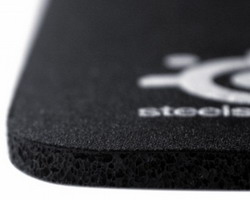
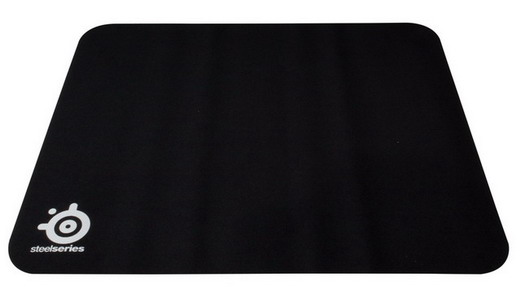
<figure class="highlight"><pre><code class="language-bash" data-lang="bash">find /home/ <span class="nt">-type</span> f <span class="nt">-name</span> error_log <span class="nt">-delete</span></code></pre></figure>]]></content><author><name>octav</name></author><category term="Tech" /><summary type="html"><![CDATA[If you ever want to delete the error_log files from all the websites hosted on your server, and you have access to the server via SSH, the following command will quietly remove these files: find /home/ -type f -name error_log -delete]]></summary></entry><entry><title type="html">SteelSeries QcK mass Mousepad professional</title><link href="https://www.octav.name/2013/03/mousepad-profesional-steelseries-qck-mass" rel="alternate" type="text/html" title="SteelSeries QcK mass Mousepad professional" /><published>2013-03-27T08:53:00+00:00</published><updated>2013-03-27T08:53:00+00:00</updated><id>https://www.octav.name/2013/03/mousepad-profesional-steelseries-qck-mass</id><content type="html" xml:base="https://www.octav.name/2013/03/mousepad-profesional-steelseries-qck-mass"><![CDATA[<p><img class="align-right" src="/wp-content/uploads/2013/03/mousepad.jpg" alt="mousepad" width="250" height="200" />For a few days now, my Logitech “little mouse” started to lose its glide on my desk, so I began searching specialized websites for a cloth mousepad. I came across the <a href="https://www.emag.ro/mousepad-profesional-steelseries-qck-mpstqck/pd/EFSVDBBBM/?psid=9386110&amp;utm_source=profitshare&amp;utm_medium=direct_link">SteelSeries QcK mass</a>, a professional cloth mousepad compatible with all types of mice. Its dimensions are 320mm x 285mm x 6mm. What I like most about it is that it doesn’t slide around on the desk—the rubberized base does its job perfectly.<!--more--></p>

<h3 id="specifications">Specifications:</h3>
<ul>
  <li><strong>Surface:</strong> Cloth</li>
  <li><strong>Dimensions:</strong> 320 x 285 x 6 mm</li>
  <li><strong>Other features:</strong> Non-slip rubber base</li>
</ul>

<p class="align-center"><a href="https://profitshare.emag.ro/click.php?ad_client=f11daf72728b1cc368fe919b8b644d1d&amp;add_id=0&amp;redirect=mousepad-profesional-steelseries-qck-mass%2Fpd%2FEFYX2BBBM/"><img src="/wp-content/uploads/2013/03/steelseries.jpg" alt="Mousepad profesional SteelSeries QcK mass" /></a></p>]]></content><author><name>octav</name></author><category term="Tech" /><category term="SteelSeries" /><category term="Gaming" /><category term="Review" /><summary type="html"><![CDATA[For a few days now, my Logitech little mouse started to lose its glide on my desk, so I began searching specialized websites for a cloth mousepad.]]></summary><media:thumbnail xmlns:media="http://search.yahoo.com/mrss/" url="https://www.octav.name/wp-content/uploads/2013/03/steelseries.jpg" /><media:content medium="image" url="https://www.octav.name/wp-content/uploads/2013/03/steelseries.jpg" xmlns:media="http://search.yahoo.com/mrss/" /></entry><entry><title type="html">LED TV Samsung UE40C5000</title><link href="https://www.octav.name/2011/04/led-tv-samsung-ue40c5000" rel="alternate" type="text/html" title="LED TV Samsung UE40C5000" /><published>2011-04-26T09:36:00+00:00</published><updated>2011-04-26T09:36:00+00:00</updated><id>https://www.octav.name/2011/04/led-tv-samsung-ue40c5000</id><content type="html" xml:base="https://www.octav.name/2011/04/led-tv-samsung-ue40c5000"><![CDATA[<p><img src="/wp-content/uploads/2011/04/UE40C5000.jpg" alt="" title="UE40C5000" width="500" height="350" class="align-right" />
<!--more--></p>

<h3 id="caracteristici-generale">Caracteristici generale</h3>

<ul>
  <li>Anynet+ (HDMI-CEC) disponibil</li>
  <li>Căutare automată de canale disponibilă</li>
  <li>Oprire automată disponibilă</li>
  <li>Echilibrare automată volum disponibilă</li>
  <li>Subtitrări acceptate</li>
  <li>Programare alarmă disponibilă</li>
  <li>AllShare (Pe platformă DNLA)</li>
  <li>EPG disponibil</li>
  <li>Mod jocuri disponibil</li>
  <li>Limbi OSD (25 de limbi)</li>
  <li>Picture-in-Picture (1 Tuner PIP)</li>
  <li>Temporizator pentru oprire automată disponibil</li>
  <li>USB (Film)</li>
  <li>Suport adaptor WiFi inclus</li>
  <li>Time Shift disponibil</li>
  <li>Still Picture disponibilă</li>
  <li>Channel List USB-Clone disponibil</li>
  <li>Filtru digital de zgomot disponibil</li>
  <li>Teletext (TTXT) Mega TTX</li>
</ul>

<h3 id="design">Design</h3>

<ul>
  <li>Design subţire</li>
  <li>Rose Black</li>
  <li>Light Effect (Deco) disponibil</li>
  <li>Model suport pătrat</li>
  <li>Model cu rotire (stânga/dreapta) inclus</li>
</ul>

<h3 id="greutate">Greutate</h3>

<ul>
  <li>Greutatea pachetului 19,3 kg</li>
  <li>Greutatea setului cu suport 15,7 kg</li>
  <li>Greutate set fără suport 12,1 kg</li>
</ul>

<h3 id="video">Video</h3>

<ul>
  <li>Dimensiune ecran 40” (101cm)</li>
  <li>Rezoluţie 1920 x 1080</li>
  <li>Motor HyperReal</li>
  <li>Wide Color Enhancer Plus disponibil</li>
  <li>Clear Motion Rate 50 x 2</li>
</ul>

<h3 id="sistem">Sistem</h3>

<ul>
  <li>Recepţie DTV DVB-T/C</li>
  <li>Tuner DTV integrat disponibil</li>
</ul>

<h3 id="eco">Eco</h3>

<ul>
  <li>Etichetă ecologică (Planet First)</li>
  <li>Eco-senzor disponibil</li>
  <li>Sursă de alimentare c.a. 220 – 240 V/50 – 60 Hz</li>
  <li>Consumul de energie (max.) 130 W</li>
  <li>Consum în Stand-by 0,3 W</li>
  <li>Consum de energie 75 W (IEC 62087 Ediţia 2)</li>
  <li>Raport maxim luminanţă 65%</li>
</ul>

<h3 id="accesorii">Accesorii</h3>

<ul>
  <li>Baterii incluse</li>
  <li>Manual de instrucţiuni disponibil</li>
  <li>Cablu de alimentare disponibil</li>
  <li>Model telecomandă TM1060</li>
  <li>Cablu subţire mamă/tată (Component, Scart, Compozit)</li>
  <li>Suport ultra subţire de montare pe perete 40-55” (400 x 400) inclus</li>
  <li>Suport VESA Wall Mount disponibil</li>
  <li>Suport Floor Stand inclus</li>
</ul>

<h3 id="audio">Audio</h3>

<ul>
  <li>Dolby Digital Plus, Dolby Pulse</li>
  <li>DTS 2.0 + Ieşire digitală</li>
  <li>Ieşire sunet (RMS) de 10 W x 2</li>
  <li>Difuzor (Propagare descendentă)</li>
  <li>Audio Woofer disponibil</li>
</ul>

<h3 id="input--output">Input &amp; Output</h3>

<ul>
  <li>1 intrare component (Y/Pb/Pr) (Utilizare obişnuită audio pentru component)</li>
  <li>1 intrare compozit (AV)</li>
  <li>Ieşire audio digitală (fibră optică)</li>
  <li>Intrare audio DVI (mufă mini) x 1 (Utilizare comună pentru intrarea audio PC)</li>
  <li>Ethernet (LAN) disponibil</li>
  <li>Cască</li>
  <li>4 x HDMI (în lateral)</li>
  <li>Intrare audio PC (mufă mini)</li>
  <li>Intrare PC (D-sub)</li>
  <li>Intrare RF</li>
  <li>Intrări şi ieşiri USB (laterale) x 2</li>
  <li>1 slot CI</li>
  <li>Conector Scart</li>
</ul>

<h3 id="dimension">Dimension</h3>

<ul>
  <li>Dimensiuni pachet 120 x 74,3 x 12 cm</li>
  <li>Dimensiuni set cu suport 97,2 x 65,6 x 25,5 cm</li>
  <li>Dimensiuni set fără suport 97,2 x 59,6 x 2,99 cm</li>
</ul>

<p><a href="/wp-content/uploads/2011/04/BN68-02656C-00L10-0302.rar">Manual</a></p>]]></content><author><name>octav</name></author><category term="Tech" /><summary type="html"><![CDATA[]]></summary><media:thumbnail xmlns:media="http://search.yahoo.com/mrss/" url="https://www.octav.name/wp-content/uploads/2011/04/UE40C5000.jpg" /><media:content medium="image" url="https://www.octav.name/wp-content/uploads/2011/04/UE40C5000.jpg" xmlns:media="http://search.yahoo.com/mrss/" /></entry></feed>